
Claude Code · 5 min
Verify the diff: the wrap-up ritual for AI-written code
The plan is on screen, the approval prompt is blinking under it, and one keypress separates a proposal from real edits to real files. The way to review AI-generated code changes isn't a vibe check after the fact — it's a short ritual with bookends: read the plan before you approve, then point the same checklist backward at the diff.
Approval is a tool call you answer
The approval prompt looks like every "OK" dialog you've ever dismissed, which is exactly what makes it the easiest moment in a session to sleepwalk through. It isn't a dialog. It's a signature on scope — and the machinery underneath it is explicit about that.
When the plan is ready, Claude calls ExitPlanMode — a real tool, listed in the tools reference with a permission requirement of yes, because you are the permission. The plan renders with a prompt asking how to proceed, and the docs list five ways to answer: approve and start in auto mode, approve with edits auto-accepted, approve and review each edit manually, keep planning with feedback, or hand the plan to Ultraplan for browser-based review. Whichever approval you pick becomes the session's permission mode — the prompt is the autonomy ladder, asking you to choose a rung for the execution.
Two controls worth knowing before you answer. Press Ctrl+G and the proposed plan opens in your text editor — you can rewrite it directly before Claude proceeds, which beats negotiating wording through chat. And "keep planning with feedback" is always on the table: an approval prompt you're not happy with is a planning round that isn't finished.
The ritual itself is three questions, asked twice:
- Does the plan name the files it will touch?
- Is the order of operations sane — dependencies before dependents?
- Are the non-goals stated — does it say what it will NOT do?
- After execution: does the diff match that same list, file for file?
The first three are the read-a-plan card from plan mode. The fourth is the wrap-up: the same list, pointed backward at the diff.
Review AI-generated code changes in four steps
- 01Run the card, then approve at the bottom rung. Check the plan's file list, order, and non-goals one last time, then pick approve and review each edit manually — for a first real session, you want to see every change as it lands. Auto-accept is for plans in codebases you trust yourself to skim.
- 02Supervise the execution. Approval flips the session out of plan mode and the edits start. Watch each one against the plan's file list — an edit to a file the plan didn't name is your cue to interrupt and ask why.
- 03Verify with git, against the plan. When Claude reports done, ask git what actually happened:
git status --shortfor the file list,git diff --statfor the size and shape. Compare against what the plan promised — not against your memory of it. - 04Close the loop with the wrap-up prompt below. Claude compares the working tree to the approved plan and flags anything it did that the plan never mentioned.
Here's step 3 on a real run — a pricing-section plan that promised index.html and style.css and nothing else, executed headlessly with edits auto-approved, which makes the after-the-fact verification the only supervision there is:
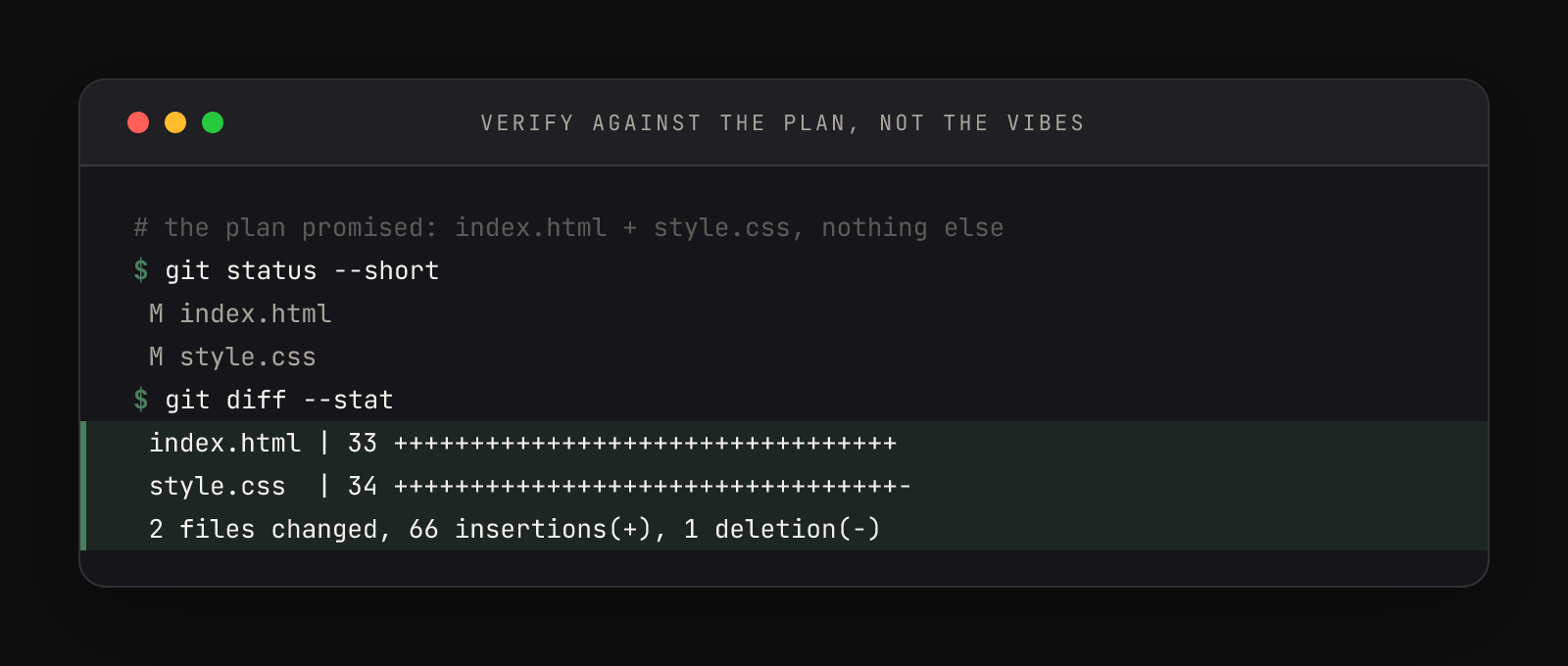
The git diff --stat lines are the verification: two files, 66 insertions, one deletion, and a file list that matches the plan exactly. The execution report carried its own surprise, too: Claude refused to claim completion, because the project's CLAUDE.md demands a browser check it couldn't perform headlessly — in its own words, the render check "has not been performed." A six-line project file stays on duty even at the finish line.
The wrap-up prompt, and what it catches
The approved plan was: <paste or restate the plan's summary>.

Compare the working tree against that plan: list what changed, and
flag anything you did that the plan did not mention. 6 lines max.On the same run, the answer came back "matches the plan, with two minor unplanned touches" — and the numbered flags were honest confessions: a shared layout rule was edited rather than purely added to, an unplanned intro line of copy appeared, and "only the existing CSS variables" turned out not to be strictly literal. None of these are disasters. They're drift, and every execution has some. Decide deliberately — keep the intro line, or ask for its removal. Either way, you decided.
Why the ritual outlives the training wheels
It would be easy to file this under beginner caution you'll shed once you trust the tool. The opposite is true: the plan, interrogate, approve, watch, verify arc is how the largest work gets delegated safely. As you climb toward higher-autonomy permission modes — accept-edits, eventually auto mode for long runs — you supervise less during execution, which makes the bookends matter more: a sharper contract going in, a stricter verification coming out. The ritual doesn't shrink as you get better; the middle of it does.
The plan-approval options in full, the Ctrl+G plan editing, and the mode each approval switches the session into are documented in Claude Code's permission modes guide. The arc itself is portable: plan, interrogate the questions, approve a rung, watch the edits, verify the diff against the plan. Approving first and reading carefully during execution is the same thing as signing before reading — and git remembering everything is only useful if you actually ask it.