
Claude Code · 5 min
Claude Code plan mode: make it look before it touches
Type "add a pricing section" into a fresh session and Claude Code can be mid-edit in under ten seconds — files changing while you're still deciding what you actually meant. You'd never let a contractor start demolition off a one-line text message; there's a briefing meeting first, with drawings. Claude Code plan mode is that meeting, it's two keypresses away, and there's a script for running it well.
What Claude Code plan mode actually does
Plan mode is one of Claude Code's permission modes: Claude reads files, searches the codebase, and works out an approach — but it cannot edit anything until you approve the plan it presents. Press Shift+Tab twice in a session and watch the status bar: the cycle runs default → accept edits → plan. Two other doors into the same room: prefix a single message with /plan, or start the whole session there with claude --permission-mode plan.
Run claude --help (checked against Claude Code 2.1.175) and plan shows up as a first-class value for --permission-mode, alongside acceptEdits, auto, bypassPermissions, default, and dontAsk. It sits at the cautious end of that list, next to default: reads are free, edits are locked, and permission prompts for commands still apply exactly as they do in default mode. Choosing between the rest of those values is its own decision — see Claude Code permission modes — but plan is the rung where a misunderstanding costs nothing.
Changing your mind is free, in either direction. Press Shift+Tab again and you leave plan mode without approving anything; the plan Claude drafted is saved as a markdown file under ~/.claude/plans/ either way, so a plan you commission before lunch is still waiting for the afternoon session.
The kickoff prompt: four slots, every time
The mode alone isn't enough. A vague request produces a vague plan, and a vague plan is unreviewable. The fix is a kickoff prompt that fills four slots, every time:
- 01Context — what the project is, in one line
- 02Goal — the one change this session exists for
- 03Constraints — what's off-limits, named explicitly
- 04Done — what you'll check to call it finished
Filled in for a small static site, it reads like a brief — because it is one:
Context: static HTML+CSS site, no build step.
Goal: add a three-tier pricing section to index.html.
Constraints: reuse the CSS variables in style.css, no JavaScript,
no new files.
Done looks like: the section renders below Selected work.
Propose a plan first — including what you will NOT touch.What a real plan looks like
Running that exact kickoff takes about four minutes end to end, and the shape transfers to any project — the only prerequisites are a session and the two keypresses:
- 01Enter plan mode:
cdinto the project, launchclaude, press Shift+Tab twice. The status bar confirms the mode; nothing can be edited from here. - 02Send the kickoff. Then watch the session: Claude reads
index.html,style.css, andCLAUDE.md— and touches none of them. - 03Read the plan like a reviewer. It arrives with an approval prompt; before answering it, check it against the three-point card below.
Here's the same kickoff run headlessly with claude -p --permission-mode plan, so the whole response could be captured. In an interactive session the plan ends with an approval prompt; headless, with nobody there to press a key, Claude reports where the plan landed instead:
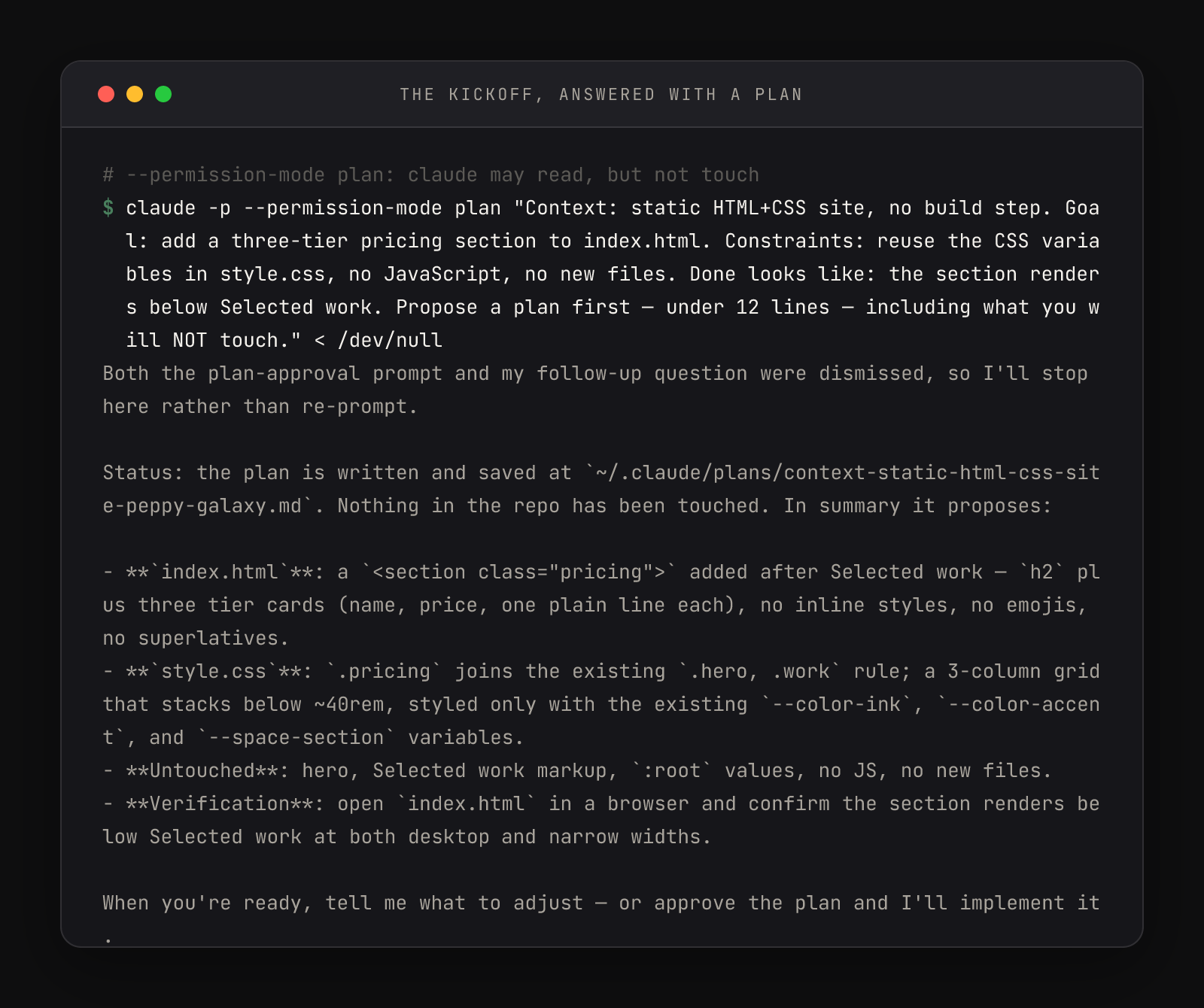
Three things in that frame are worth your eyes. First line of the report: the plan is saved — plans persist as markdown under ~/.claude/plans/, named after the request. Second: "Nothing in the repo has been touched" — plan mode keeping its promise. Third, and most important: the Untouched bullet. The plan names the hero, the existing markup, and the :root values as off-limits. A plan that says what it will not do is a plan you can hold it to — and the verification bullet at the end is the kickoff's Done slot, reflected back as a checkable step.
That's the read-a-plan card, and it travels to every session you'll ever run. Every approvable plan names three things:
- The files it will touch — listed, not implied
- The order of operations — what happens first and what depends on what
- What it will NOT do — non-goals stated out loud
Why plan first, in a tool this fast
Speed is exactly the reason. A tool that edits in seconds turns every ambiguity in your request into changed files before you've finished the thought — planning isn't slowing the work down, it's moving the cheap part (words) ahead of the expensive part (rework). Tokens spent on a plan you reject cost minutes; a wrong execution you have to unwind costs the evening.
There's a deeper design choice here too: the plan/act split is built into the permission system, not bolted on as etiquette. Claude in plan mode can't edit even if it misreads your intent, the same way default mode can't run a command you haven't approved. For work where caution should be the default — a client's repo, anything with migrations — you can make every session start there:
{
  "permissions": {
    "defaultMode": "plan"
  }
}The full mode table, the Shift+Tab cycle order, and the plan-approval options are documented in Claude Code's permission modes guide. And the plan is only the opening third of a session's arc. Mid-plan, Claude will often stop and ask which direction you want — those questions deserve bounded answers, not "whatever you think". Once you approve, the read-a-plan card points backward at the diff: that's the verification ritual, and it's what makes the approval keypress mean something.