
Workflow · 6 min
One command to open any project with Claude running
Here's the morning ritual worth deleting: open the terminal, cd into the right project (two attempts — you typo'd the folder), remember whether a Zellij session already exists for it, attach or create one, launch Claude. Five moves, every project, every day. An fzf project picker wired into zsh collapses it to one word — dev — a fuzzy picker, and Enter.
One word, three jobs
dev is a zsh function that lives in ~/.zshrc, and the listing below is the entire thing, unedited. Read it once, top to bottom, and spot the three jobs: pick a project, name a session, land in it with Claude running.
DEV_DIRS=(~/"App Development")

# Dev launcher with project picker
# Usage: dev (resume/start session) | dev-new (isolated worktree) | dev-done (merge + cleanup)
function dev() {
    local new_worktree=false

    if [[ "$1" == "-new" ]]; then
        new_worktree=true
        shift
    fi

    if [[ -n "$1" ]]; then
        local target_dir="$1"
    else
        local target_dir=$(printf '%s\n' "${DEV_DIRS[@]}" | xargs -I{} find {} -maxdepth 1 -type d | sort | fzf \
            --height 40% \
            --reverse \
            --prompt "  Pick a project: " \
            --header "  Your Projects  (@ = worktree branch)" \
            --border rounded \
            --delimiter='/' --with-nth=-1)
    fi

    [[ -z "$target_dir" ]] && return

    # If -new, prompt for branch name and create a worktree
    if [[ "$new_worktree" == true ]]; then
        printf "Branch name: "
        read branch
        [[ -z "$branch" ]] && return
        local worktree_dir="${target_dir}@${branch}"
        if [[ ! -d "$worktree_dir" ]]; then
            git -C "$target_dir" worktree add "$worktree_dir" -b "$branch" 2>/dev/null \
                || git -C "$target_dir" worktree add "$worktree_dir" "$branch"
        fi
        target_dir="$worktree_dir"
    fi

    local session_name=$(basename "$target_dir" | tr ' .@' '-' | tr '[:upper:]' '[:lower:]' | cut -c1-32)

    cd "$target_dir"

    # Make sure computer-use is enabled for this dir before claude starts.
    _claude_enable_computer_use "$target_dir"

    # Clean up dead sessions, then attach or create
    zellij delete-session "$session_name" 2>/dev/null
    if ! zellij attach "$session_name" 2>/dev/null; then
        local layout_file=$(mktemp /tmp/zellij-dev.XXXXXX)
        cat > "$layout_file" <<EOF
layout {
    tab name="$session_name" {
        pane command="zsh" {
            args "-ic" "cd '$target_dir' && claude --dangerously-skip-permissions --remote-control --name '$session_name'; exec zsh"
        }
    }
}
EOF
        zellij -s "$session_name" -n "$layout_file"
        rm -f "$layout_file"
    fi
}Pick. DEV_DIRS is the list of folders where your projects live — an array, so you can list several. The function prints each one, asks find for every directory exactly one level deep (-maxdepth 1 -type d), sorts them, and hands the list to fzf — which draws a picker in the bottom 40% of the pane (--height 40%), with a rounded border and a prompt reading Pick a project:. The --with-nth=-1 flag is a nice touch: paths split on / and only the last segment is displayed, so you see clean project names while fzf still returns the full path.
Name. Whatever you pick becomes a session name: basename takes the folder name, tr flattens spaces, dots, and @ into dashes and uppercase into lowercase, and cut -c1-32 caps it at 32 characters.
Land. The function tries to attach to a Zellij session with that name. If none exists, it writes a tiny throwaway layout file that launches Claude in the project directory and boots a fresh session from it. Either way, you land in a named session with Claude up.
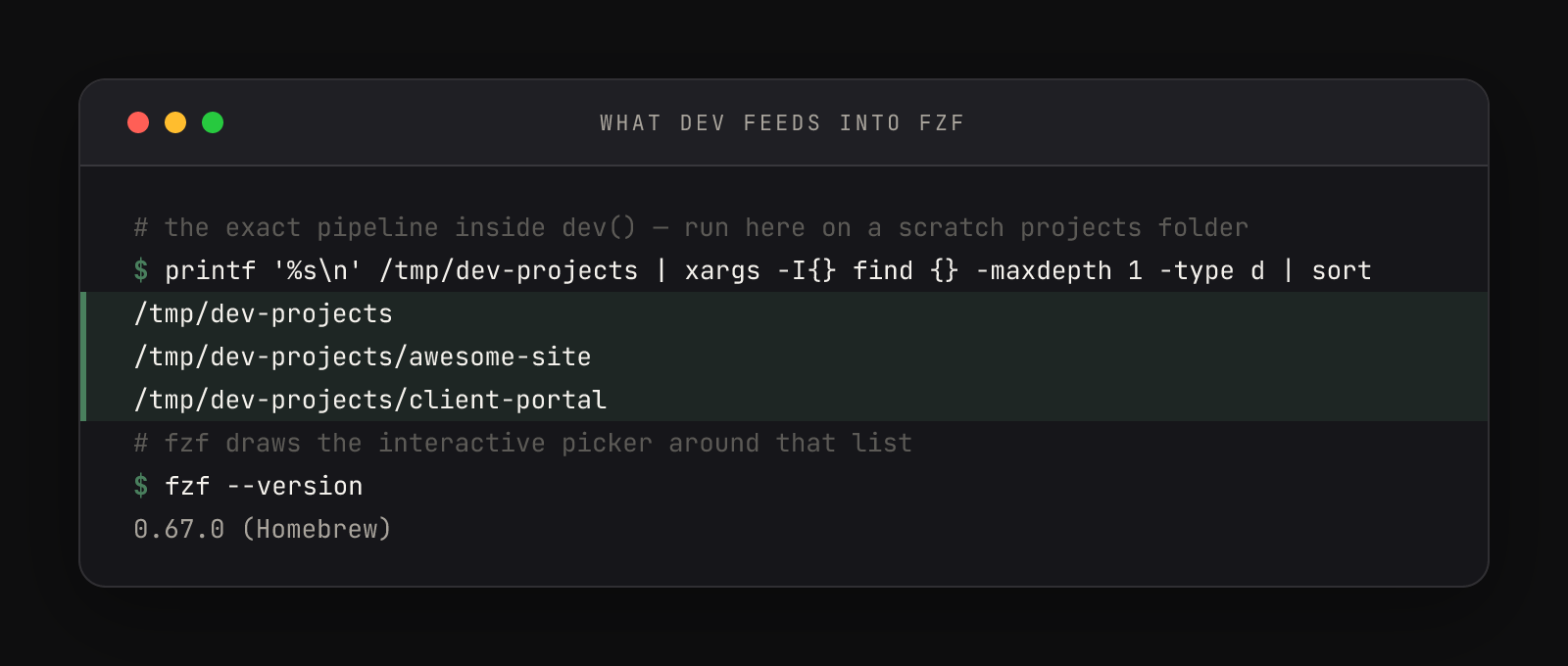
That first output line in the frame is the parent folder itself — find always includes its starting point. In daily use the fuzzy filter makes it invisible: type three letters of a project name and it's gone.
Install the fzf project picker in zsh
- 01Install fzf:
brew install fzf. The function above was verified against fzf0.67.0, Zellij0.43.1, and Claude Code2.1.175. - 02Paste the function into
~/.zshrc, then replace theDEV_DIRSline with your own parent folder(s) —DEV_DIRS=(~/Projects ~/Clients). Every directory sitting one level inside any folder you list becomes pickable. - 03Note the helper call:
devinvokes_claude_enable_computer_use, a small companion function that pre-enables the computer-use MCP connector for the project directory by editing~/.claude.jsonbefore Claude starts. If you don't use that connector, delete the line — nothing else depends on it. - 04Reload and run:
source ~/.zshrc, then typedev. The picker opens; type a few letters, press Enter. You land inside a Zellij session named after the project, with Claude's welcome screen already up in the right directory. - 05Prove the reattach: detach with
Alt+q, then rundevand pick the same project. No new session, no duplicate — you're back in the same conversation, because the derived name matched andzellij attachfound it alive.
Step 5 is the detail that turns dev from a launcher into a resume button. The session name is derived, not random — the same folder always produces the same name:
$ basename "/tmp/dev-projects/Awesome Site@hero-fix" | tr ' .@' '-' | tr '[:upper:]' '[:lower:]' | cut -c1-32
awesome-site-hero-fixEvery messy folder name maps to one stable, Zellij-safe session name, and that mapping is the entire reattach guarantee. It's the same promise behind detaching and reattaching Zellij sessions, made automatic — close the terminal entirely, mid-conversation, and Claude keeps working, because what dev built is a named, detachable session, not a window.
Read the script before you run it
Ninety-odd lines of someone else's shell deserve a once-over before they live in your ~/.zshrc. This function has two tricks that look like sorcery until they don't, plus one set of flags you should consciously sign off on.
The layout that exists for two seconds. mktemp /tmp/zellij-dev.XXXXXX creates an empty file with the X's replaced by random characters, and the cat > "$layout_file" <<EOF heredoc writes everything until the closing EOF into it. Because the EOF is unquoted, the shell expands $session_name and $target_dir before writing — the file Zellij receives has real values baked in. The zsh -ic in the args line starts an interactive shell (-i), which sources ~/.zshrc — that's why your PATH and functions exist inside the pane — and the trailing ; exec zsh means that when Claude eventually exits, the pane becomes a normal shell instead of dying. Then rm -f shreds the evidence. A temp file instead of a saved layout because the values change per launch: a permanent file would need templating; a two-second file is the template, filled.
The `||` fallback. In the worktree branch of the function, || means "if the left side failed, run the right side": the first git worktree add creates a new branch (-b) and fails when the branch already exists; the second checks out the existing branch instead, and 2>/dev/null throws away the scary fatal: line in between. Optimistic attempt, silenced complaint, graceful fallback — once you can read that shape, you'll spot it in shell scripts everywhere. The worktree lane itself is a separate workflow, covered in the git worktree workflow.
The flags baked into the layout. The pane launches claude --dangerously-skip-permissions --remote-control --name. The first flag is an autonomy decision — full speed inside trusted project folders, no permission prompts — and the other two make the session identifiable and reachable from Claude's apps. If the first one reads as more trust than you're ready to extend, change it. The point of reading the script is that it answers to you now.
Here's a shell function from my config. Walk me through it line by line:

<paste the function here>

For each line or small group: 1) what it does mechanically, 2) why a
sane author would want that, 3) anything that could surprise me —
silent failures, things deleted or overwritten, commands that hit the
network. End with: what's the worst thing this function could do?Then mark the file as yours with one deliberately cosmetic edit: change --prompt " Pick a project: " to words you'd actually say, and consider --height 60% if your project list is long — 40% is the default above. Run source ~/.zshrc and the picker opens wearing your words. Every fzf flag in the function has a page of siblings worth raiding later — preview windows, multi-select, colors — in the fzf README.
Why a session, not a window
A window dies with the app; a named Zellij session survives a crash, a quit, and an overnight gap, and dev is your one-word way back into it. The function also has two siblings sharing its picker and naming machinery: dev-new mints an isolated worktree for risky experiments, and dev-done merges and cleans up after them. Together the three commands are the whole loop — there's a one-card summary of all three if you want the shape before the details.