
Terminal · 5 min
Zellij detach and reattach: sessions that survive a crash
Claude is twenty minutes into a long migration and you need the screen for something else — or need to quit the terminal app, or leave entirely. One keystroke handles all three: press Alt+q to detach the Zellij session, and it drops out of sight with everything inside it still running. Hours later you type zellij attach studio and the work is exactly where you left it.
Detaching a Zellij session ends the viewing, not the work
Alt+q disconnects your window from the session — that's all it does. The Zellij server keeps owning the panes, and every process inside them keeps running at full speed with nobody watching. (Alt+q is the detach chord from the studio's Zellij keybindings, a flat keymap where detach is one chord instead of a mode trip.)
That claim — nothing pauses, nothing restarts — is the kind you should demand evidence for. The frames below are a studio machine making it auditable: a session with no window attached anywhere, and a counter loop inside it, 41 seconds into its run.
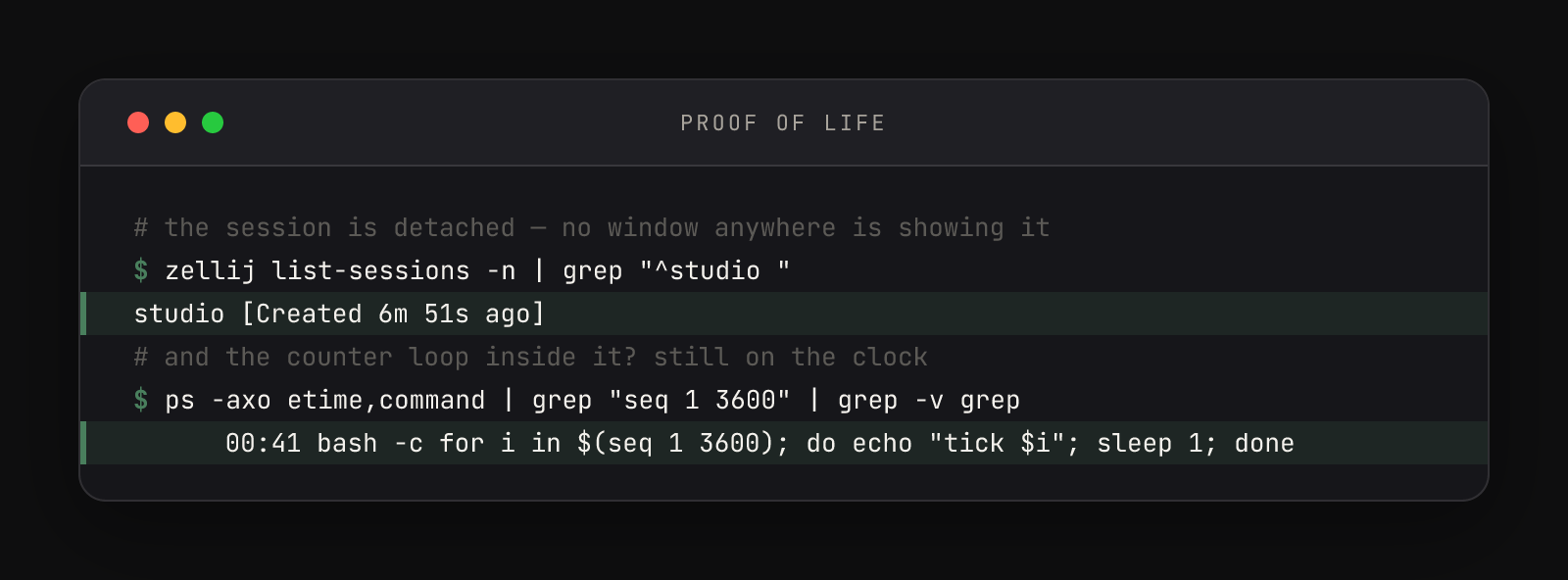
The second command there is the useful trick: ps -axo etime,command lists every process with its elapsed time — how long it's been alive. You can interrogate a detached session from the outside, no reattaching required. Ten and a half minutes later — the terminal app closed the whole time — the same two questions again:
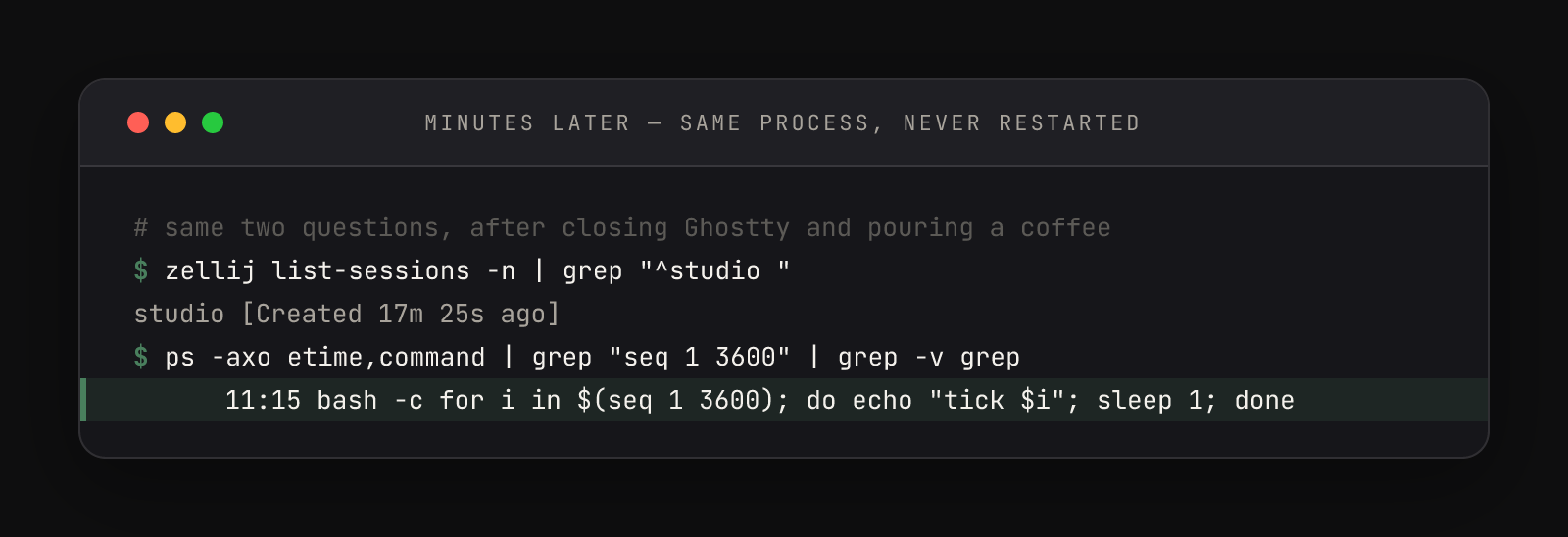
Compare the two frames line by line: the elapsed time grew by exactly the wall-clock gap between captures. A restarted loop would have reset to 00:00. This one never blinked.
Prove it in five minutes
The full round-trip, with the harshest test in the middle — quitting the entire terminal app.
- 01Start something you'd miss. Inside a Zellij session named
studio, run an hour-long counter:for i in $(seq 1 3600); do echo "tick $i"; sleep 1; done - 02Detach at a number you'll remember. Watch it reach, say, tick 20 — then press Alt+q. You drop back to a plain shell. The ticking continues where you can't see it.
- 03Verify from outside.
zellij list-sessionsshowsstudioalive. For the stronger proof, runps -axo etime,command | grep "seq 1 3600" | grep -v grepand watch the elapsed time climb between runs. - 04Quit the terminal app — the whole app. Cmd+Q, not Cmd+W. Every window gone, the app itself gone. The session's server doesn't belong to the terminal, so nothing happens to it.
- 05Relaunch and reattach with
zellij attach studio. The counter is in the hundreds now, with no gap in the numbers — every tick between your detach and this moment happened on schedule.
One honest boundary so your mental model stays true: detach protects work from dying windows, not from a sleeping machine. Close the laptop lid and macOS suspends everything — the counter pauses with the rest of the computer and resumes on wake, session intact. What you've removed is the fatal failure mode: nothing about a closed window, a quit app, or a forgotten viewport can kill the work anymore.
For Claude specifically, detach has a superpower sleep doesn't touch: a detached agent keeps executing its task at full speed while you do something else entirely. Pair it with the notification hook in settings.json and the machine taps you on the shoulder when the task finishes.
The quit-on-close gotcha
Stock Zellij detaches a session when its window is force-closed — a forgiving default that quietly saves beginners. The studio config flips it with one line, on_force_close "quit", and the flip is worth understanding before it surprises you.
Ending isn't erasing, either. A quit or killed session stays in zellij list-sessions marked EXITED - attach to resurrect, and attaching rebuilds its layout — though the processes genuinely died; a resurrected counter starts back at tick 1. For deliberate endings there are two commands, shown here running for real against the session that produced the frames above:
$ zellij kill-session studio
$ zellij list-sessions -n | grep "^studio "
studio [Created 16m 39s ago] (EXITED - attach to resurrect)
$ zellij delete-session studio
Session: "studio" successfully deleted.# the detach round-trip, complete
zellij attach studio # in, by name — then Alt+q to step away
zellij list-sessions # studio [Created …] — still alive
zellij attach studio # back; nothing paused, nothing restarted
zellij kill-session studio # end it on purpose (processes stop)
zellij delete-session studio # erase the recordThe full action reference — attach, kill, delete, and the rest of the session verbs — lives in the Zellij CLI actions documentation, with on_force_close and its siblings under options.
This habit is the foundation the rest of a terminal-first workflow stands on. When the dev command launches Claude inside a named session, Alt+q is how you walk away from a working agent mid-task — confident, not hopeful.