
Workflow · 6 min
A git worktree workflow for AI agents that can't break main
There's an experiment you've been postponing — rip out the nav, swap the data layer, let Claude loose on a redesign — because your main checkout is working and you'd rather not bet it. A git worktree workflow ends the postponing: one command mints a complete second copy of the project in a sibling folder, on its own branch, with its own Claude session inside. Break whatever you like in there. The folder you trust never moves.
A worktree is a second body, same memory
Git normally gives a repository one working directory — switch branches and the files in front of you transform in place, which is exactly what makes experiments feel risky mid-flight. A worktree breaks that limit: git worktree add attaches an additional working directory to the same repository. Same history, same commits, same remotes — but its own checked-out files, its own HEAD, its own branch. Git calls the original your main worktree and the new one a linked worktree.
dev-new — a two-line zsh sibling of the dev command — wraps that in a naming convention: the new folder lands at {project}@{branch}, right next to the original. The @ naming is a local convention, not git's; git's docs default to whatever path you type, like ../hotfix. The slightly longer name buys two things: the project picker sorts worktrees directly under their parent project, with @ reading as "branch of" at a glance, and the cleanup command can later split awesome-site@experiment back into repo and branch mechanically.
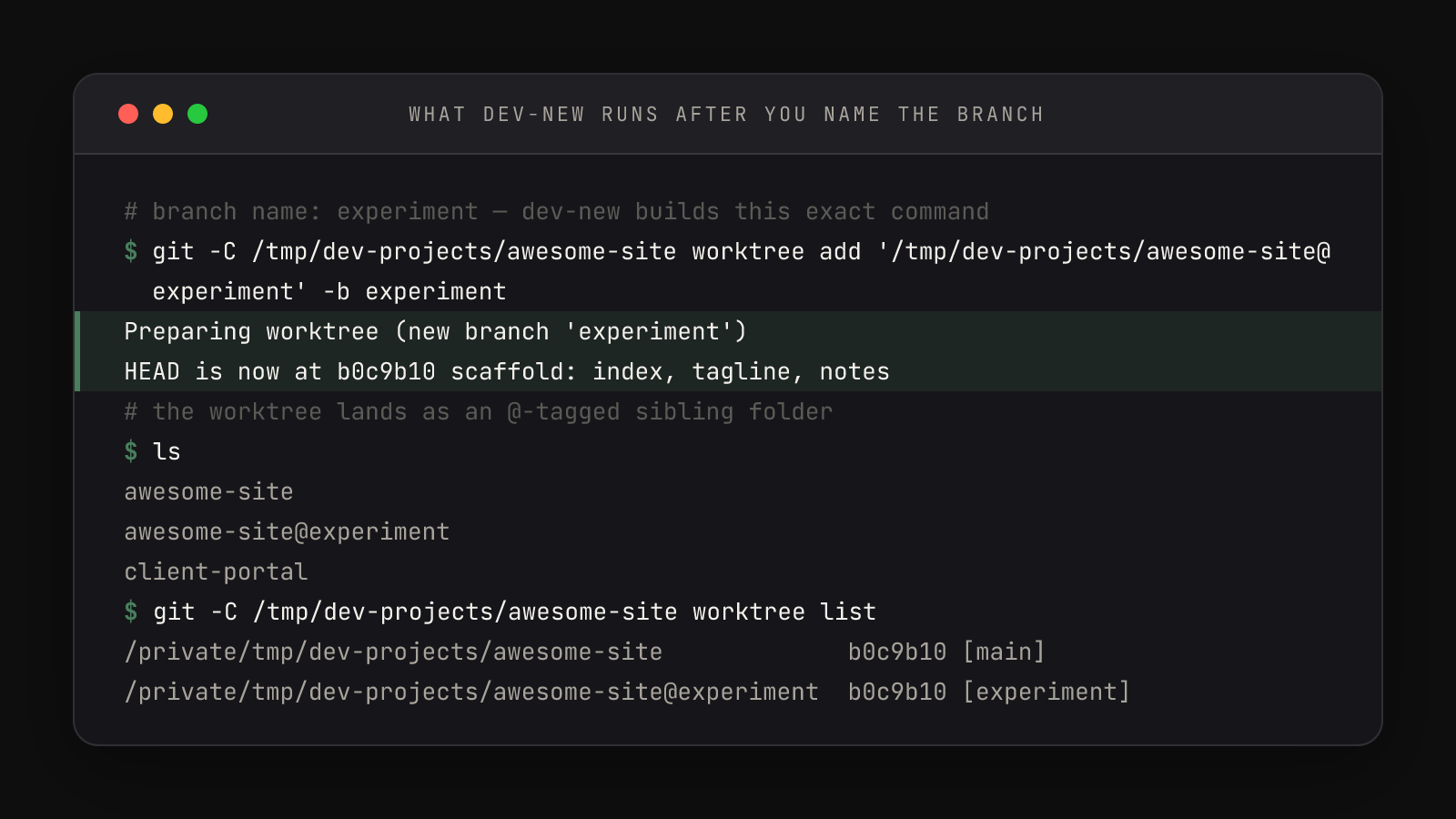
Read the git worktree list lines at the bottom of that frame closely: both worktrees sit at the same commit (b0c9b10). Two folders, one history — a commit made in either is instantly part of the repository both share. And the sibling is not a copy in the duplicate-the-folder sense: at 50 commits or 50,000, the worktree shares the original's .git object store instead of duplicating it, which is why creation takes about a second.
The creation line inside the function is a fallback chain:
git -C "$target_dir" worktree add "$worktree_dir" -b "$branch" 2>/dev/null \
|| git -C "$target_dir" worktree add "$worktree_dir" "$branch"First try creates a new branch (-b). If that fails — usually because you've used this branch name before — the second try checks out the existing branch into the worktree instead, with 2>/dev/null swallowing the complaint. Run dev-new with a name you've used and you resume that experiment rather than erroring out. dev-new itself is the smallest function in the file — just dev -new "$@" — same picker, same session machinery, plus a Branch name: prompt where an empty answer cancels the whole thing.
Why this git worktree workflow makes full autonomy safe
The launcher starts Claude with --dangerously-skip-permissions — full speed, no permission prompts — and the obvious question is what contains a bad decision made at that speed. This folder does. Inside awesome-site@experiment, the worst realistic outcome — Claude mangles files, deletes the wrong directory, commits nonsense — is confined to a disposable checkout and a branch you can refuse to merge. Your main worktree, the one your dev server is probably serving right now, is physically elsewhere and never moves. Blast-radius containment is what makes high autonomy a sane default rather than a thrill ride — the same calculus behind choosing a permission mode deliberately.
It's also the sanctioned answer to running multiple agents at once: parallel agents are fine when each owns a worktree. Three experiments, three @ folders, three Claude sessions, zero file collisions — and the picker shows all of them, @-tagged, ready to resume. The whole argument fits on one card: worktrees can't break main.
dev-done: the teardown, in order
Experiments have to land or die, and either way there's a Zellij session to kill, a branch to merge, a worktree folder to remove, and a branch name to delete. Skip any one of them and your picker fills with zombie @ folders within a week. dev-done is all four chores behind one fuzzy pick — read it as a checklist running top to bottom:
function dev-done() {
    local worktree_dir=$(printf '%s\n' "${DEV_DIRS[@]}" | xargs -I{} find {} -maxdepth 1 -name "*@*" -type d | sort | fzf \
        --height 40% \
        --reverse \
        --prompt "  Finish worktree: " \
        --header "  Active Worktrees" \
        --border rounded)

    [[ -z "$worktree_dir" ]] && return

    local worktree_name=$(basename "$worktree_dir")
    local branch="${worktree_name##*@}"
    local repo_dir="${worktree_dir%%@*}"
    local session_name=$(echo "$worktree_name" | tr ' .@' '-' | tr '[:upper:]' '[:lower:]' | cut -c1-32)

    # Kill the zellij session
    zellij kill-session "$session_name" 2>/dev/null
    zellij delete-session "$session_name" 2>/dev/null

    # Merge into main
    echo "Merging '$branch' into main..."
    if git -C "$repo_dir" merge --no-edit "$branch"; then
        git -C "$repo_dir" worktree remove "$worktree_dir" --force
        git -C "$repo_dir" branch -d "$branch"
        echo "Done! '$branch' merged into main and cleaned up."
    else
        echo "Merge conflict — resolve it in $repo_dir, then run dev-done again."
    fi
}The picker is the launcher's picker with one filter changed: -name "*@*" finds only worktree folders, so you can't accidentally "finish" a real project. The @ convention pays off in the next two lines — ##*@ strips everything up to the @ to get the branch, %%@* strips from the @ onward to get the repo. Then the teardown: kill-session stops the session if it's running, delete-session erases its record so nothing tries to resurrect a session whose folder is about to vanish, and the git half lands the work. On a successful run you'll see either Merge made by the 'ort' strategy. — main and the branch had each moved, so git wove them together into a merge commit — or a quieter Fast-forward when main hasn't moved since the worktree was made. Both are success: after the merge, the @ folder is gone from ls, the branch is deleted, and git worktree list is back to one line.
The one honest failure mode
When main and the branch both edited the same lines, no command can decide who wins — so dev-done deliberately stops:
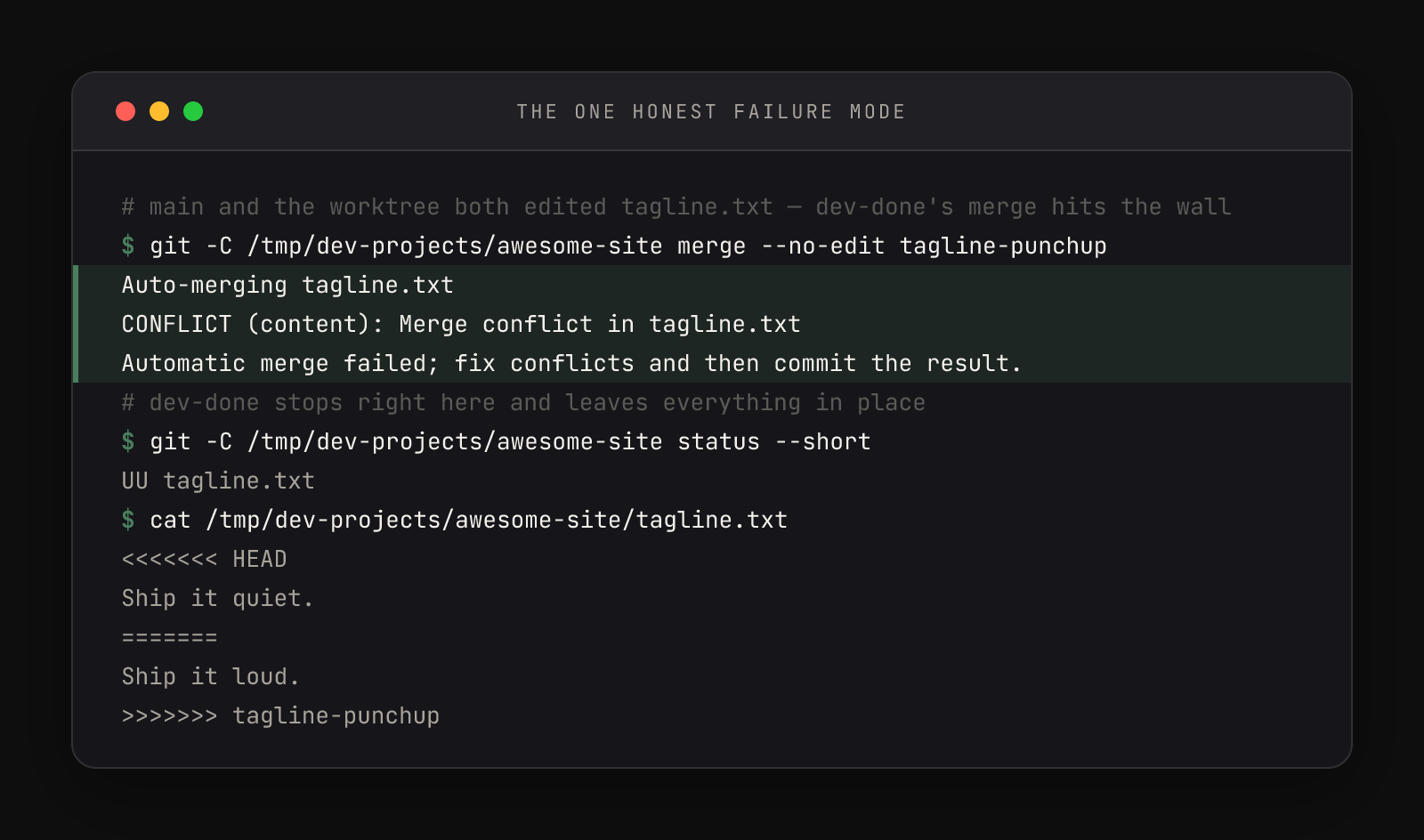
Git wrote both versions into the file between <<<<<<< and >>>>>>> markers, with ======= as the dividing line. Nothing is lost, nothing is merged, and the function prints its recovery instruction: Merge conflict — resolve it in {repo}, then run dev-done again. The fix is three moves in the main project folder — edit the file to the version you actually want (delete the markers), git add it, git commit --no-edit to complete the merge — then run dev-done again and pick the same worktree. Its merge prints Already up to date. and the function proceeds straight to the cleanup it skipped:
# tagline.txt edited by hand first — markers deleted, one version kept
$ git add tagline.txt
$ git commit --no-edit
[main 4dc43c0] Merge branch 'tagline-punchup'
$ git merge --no-edit tagline-punchup
Already up to date.Why -d, why --force, why no push
Four choices in those git lines are guardrails, not shortcuts. The first is merge itself — not rebase, not squash. A rebase rewrites the experiment's commits onto new IDs and can make you re-fight the same conflict once per commit; a merge takes the branch's history exactly as Claude and you made it and adds one stitch. For a local two-branch loop that runs several times a day, the boring, predictable verb wins.
The second guardrail is -d on the branch delete, which refuses to delete a branch whose commits haven't been merged — so even a mis-pick can't vaporize work:
$ git branch -d spike
error: the branch 'spike' is not fully merged
hint: If you are sure you want to delete it, run 'git branch -D spike'
hint: Disable this message with "git config set advice.forceDeleteBranch false"The capital -D that hint mentions is the override you should type yourself, never script. Meanwhile worktree remove runs with --force for the opposite reason: by that point the branch is merged, so anything left in the folder is uncommitted debris — node_modules, build output, scratch files — and plain remove would refuse over exactly that junk. Merged work is protected by -d; disposable junk is bulldozed by --force. Each flag points its strictness where it belongs. The full reference — list, remove, prune, locking — is in the git-worktree docs.
And the missing chore is deliberate: dev-done never pushes. The whole loop — branch, build, merge, clean — is local machinery; publishing to GitHub is a separate decision you (or Claude, via gh) make when the work is ready for the world. Bundling a push into a cleanup command would make "tidy up my experiment" silently mean "ship it."