
Terminal · 5 min
Your first Zellij session: install, name it, keep it
This Zellij tutorial has one destination: ten minutes from now you'll close a terminal window mid-task on purpose — and lose nothing. One brew install, one named session, and the same Cmd+W that kills ordinary terminal work becomes a non-event. Most of the ten minutes is spent enjoying the result.
One install, one name
Homebrew carries Zellij, so the install is one command. The part that deserves a moment of thought is the name. Sessions are addressed by name — zellij attach studio only works because something is called studio — and naming sessions after the work they hold is a habit worth starting on day one. (If you're still weighing whether a multiplexer is worth learning at all, Zellij vs tmux makes the case and compares the options honestly.)
Two questions verify the install: brew list --versions zellij reports Homebrew's record, and zellij --version asks the binary itself. Both should answer zellij 0.43.1 — the version current as of June 2026 — or newer. A fresh install prints download-and-pour lines first, then leaves you able to ask exactly those two questions.
The ten-minute Zellij tutorial, in seven steps
- 01Install Zellij. In any terminal:
brew install zellij. Under a minute on most connections. - 02Verify the binary answers. Run
zellij --version. You wantzellij 0.43.1or newer. - 03Start a named session. Run
zellij -s studio— the-snames it. Your prompt comes back, now framed: a tab bar across the top, and a status bar across the bottom listing keybindings. Those hints are training wheels, and for this week they're exactly what you want — read them like a menu. - 04Split a pane. Press Alt+n (hold Option, tap n). A second pane opens. Run
lsin it, then hop back and forth with Alt+h and Alt+l. - 05Close the window — really. Start a counter in one pane:
for i in $(seq 1 600); do echo "tick $i"; sleep 1; done— then hit Cmd+W and confirm. Out of the box, Zellij reacts to a force-closed window by detaching, not dying. - 06Confirm the survivor. Open a fresh window and run
zellij list-sessions. There it is:studio, with its age, utterly unbothered. - 07Reattach. Run
zellij attach studio. Both panes return — and the counter never skipped a tick.
Step 4 leans on one piece of terminal plumbing: on a Mac, the Option key types special characters by default, so Alt+n only reaches Zellij if your terminal sends Option as Alt. In Ghostty that's one line, macos-option-as-alt = true, covered in the 12-line Ghostty config. If pane splits type strange characters instead, that line is the fix.
![Terminal showing zellij list-sessions piped through grep printing the single line: studio [Created 6m 51s ago]](/shots/library/named-session.png)
That single line is the whole promise of a multiplexer: a session with an age measured from its own birth, not the window's. The grep in the frame trims a long session history down to the one row that matters here — yours will likely show studio alone.
Read the furniture
While you're inside the session, spend thirty seconds actually reading the interface. The top bar lists tabs. The bottom bar lists modes — pane behind Ctrl+p, tab behind Ctrl+t, session behind Ctrl+o — each opening a submenu of keys when pressed. You don't need to memorize any of it; you need to notice that the interface carries its own manual. That discoverability is most of the reason to pick Zellij over tmux in the first place.
A word on names while the habit is fresh: keep them lowercase, hyphenated, and project-shaped — studio, client-site, foreignfm-universe. A launcher script like the dev command generates session names from project folders exactly that way (it lowercases, swaps spaces for hyphens, and trims to 32 characters), so the names you type by hand now will sit naturally beside the ones it generates later.
Why the training wheels stay on (for now)
Stock Zellij is chatty by design: the bottom bar advertises modes and keys, pane frames draw borders, the tab bar labels everything. A tuned config eventually strips most of that away — simplified_ui true, pane_frames false, a compact layout — because once the keybindings live in your hands, the chrome is noise.
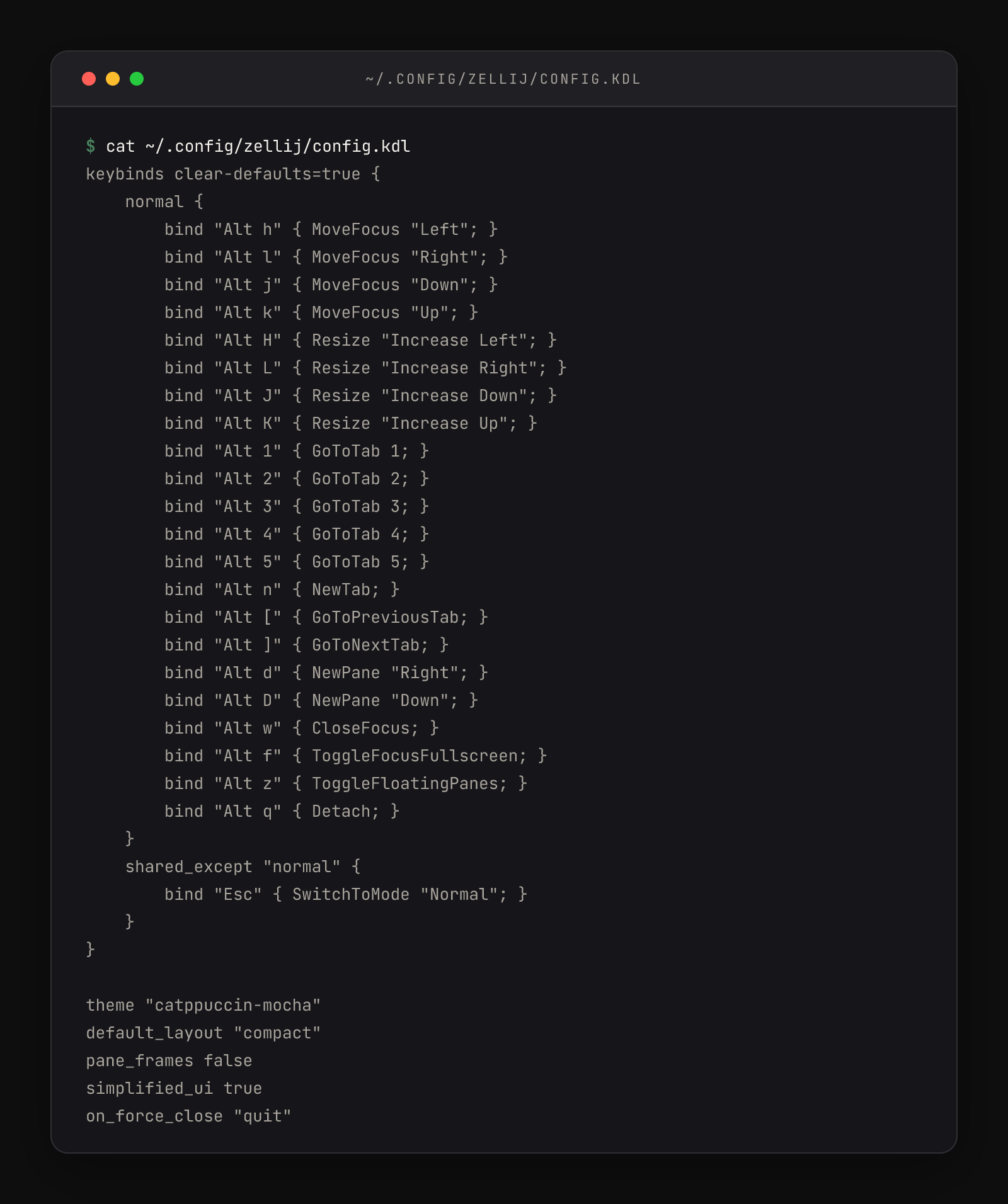
The order matters. Learning the quiet config first means memorizing keys from a reference page; learning the loud default first means the interface itself teaches you, and the config change later feels like removing scaffolding from a finished wall. A few days of visual clutter is cheap tuition. Every install path beyond Homebrew — cargo, prebuilt binaries, third-party repositories — is documented at zellij.dev/documentation/installation.
Detaching is also something you'll do on purpose, not just by accident — stepping away from a session at the end of the day and picking it up tomorrow from a new window. Detach and reattach covers that lifecycle, including the full argument for changing the force-close default.
Your session lifecycle card
The four commands you'll use daily, complete and in order:
brew install zellij      # once per machine
zellij -s studio         # start a named session
zellij list-sessions     # what's alive right now
zellij attach studio # come back to it, from any windowzellij --versionanswers 0.43.1 or newer- Started a session named
studiowithzellij -s studio - Split a pane with Alt+n and moved focus with Alt+h / Alt+l
- Closed the window mid-task with Cmd+W
- Saw
studiolisted inzellij list-sessionsfrom a new window - Reattached with
zellij attach studioand found everything alive