
Claude Code · 5 min
When Claude Code asks you a question, don't waste it
Mid-session, Claude Code sometimes stops and asks which direction you want — a multiple-choice panel, right in the terminal. That's the AskUserQuestion tool, and the pause it creates is the single highest-leverage moment you get in a session. Most people waste it by typing "whatever you think looks best" and handing over the steering wheel.
AskUserQuestion is a tool, literally
When your request is ambiguous, Claude Code can call AskUserQuestion — a built-in tool that presents multiple-choice questions in your terminal instead of guessing. It sits in the tools reference alongside Edit and Bash, and it needs no permission prompt: asking you something is the one action that's always safe. You pick an option (or answer in your own words) and the session continues with your decision baked in.
If you've ever taken a client brief, you know this conversation from the other side. A client sends "make it feel more premium," you ask three sharp questions to turn that into a brief, and the answers decide whether the project lands or wanders for two weeks. When Claude stops to ask, you're the client now — and the quality of your answer sets the quality of everything downstream.
Scope creep wearing a question's clothes
Hand a deliberately underspecified brief — "make the homepage feel more premium" — to a real session and it unpacks into three multiple-choice decisions: design direction, restyle versus build-out, and what external resources are allowed. Read the build-out question's biggest option carefully: "Full homepage — add nav, a footer, maybe a short about line, plus the work grid." That's not a clarification, that's a proposal to triple the project. Nothing dishonest is happening; Claude is offering the full menu. But every option you accept is work you've commissioned, and innocent-looking options are where sessions sprawl.
Answer with a decision plus a boundary
The exercise that makes this concrete takes a few minutes in any small project, ideally in plan mode so nothing can change while you practice — the questions behave exactly the same there, and the stakes are zero:
- 01Send a vague brief on purpose:
make the homepage feel more premium. Underspecified requests are exactly what triggers clarifying questions — watch the options arrive instead of edits. - 02Answer with a decision plus a boundary. Not "whatever you think" — pick a direction and draw the line in the same breath: quiet editorial, restyle only, do NOT touch the palette, no new content, fonts, or images this session.
- 03Check the boundary made it into the plan. The revised plan should repeat your "do not" back to you. If your boundary isn't in the plan, it isn't in the work — restate it before going further.
Here's step 3 captured for real — that exact bounded answer, sent through plan mode. Notice the plan's own summary ends by listing what stays untouched:
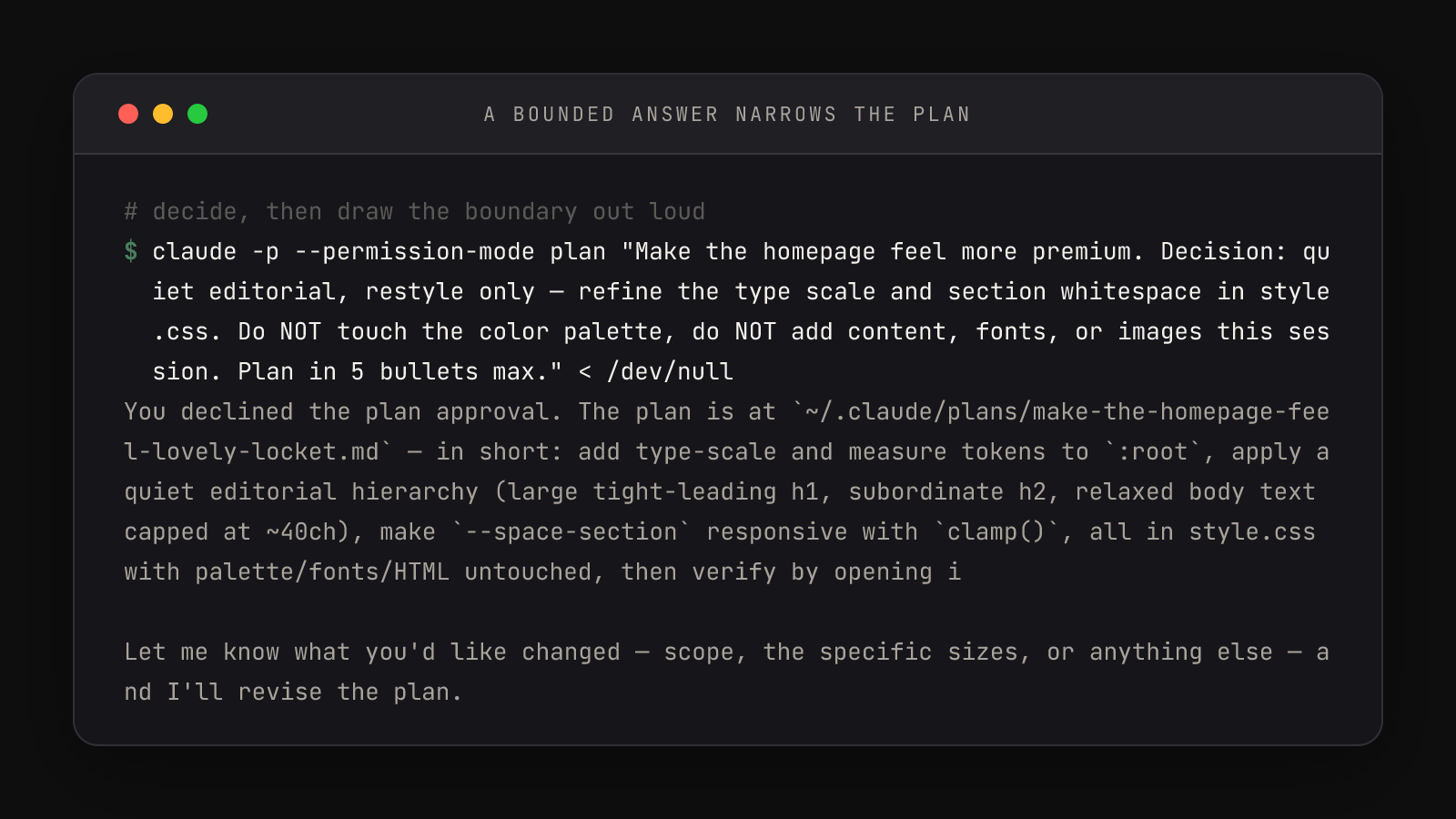
Compare the two ways of answering the same question — they cost the same number of seconds to type. Vague: "Whatever you think looks best — you're the expert. Make it premium." Bounded: "Quiet editorial, restyle only — refine the type scale and section whitespace in style.css. Do NOT touch the color palette, do NOT add content, fonts, or images this session."
The vague answer delegates every open decision — direction, scope, and budget — to a model optimizing for "premium" with no constraints; whatever lands, you can't call any of it wrong, because you authorized all of it. The bounded answer reads like a change order: one direction, one file, three named exclusions. When the diff arrives, you'll review it against words you chose.
Three answer patterns cover nearly every question
1. Decide and bound:
   "Yes to the type scale work — but only in style.css, and do not
   touch the color palette this session."

2. Defer explicitly:
   "Good idea, park it — add it to notes.txt as a future task and
   continue with the original scope."

3. Redirect to the constraint:
   "Whatever CLAUDE.md says — the project file is the authority on
   stack and package manager questions."
The second pattern matters more than it looks: "park it" keeps a good idea without buying it today. The third turns recurring questions into one-time answers — if Claude keeps asking about tooling or package managers, the answer belongs in the project's CLAUDE.md, not in your chat history.
Why the questions are the good part
It's tempting to read clarifying questions as the tool being slow or needy. Flip it: the question is the model declining to gamble with your time. Every ambiguity it resolves by asking is an ambiguity it won't resolve by guessing inside a 200-line diff you then have to audit. Thirty seconds of deciding beats thirty minutes of reviewing the wrong thing.
Ignoring the question is the worst move available, worse than either a vague or a bounded answer — an unanswered ambiguity gets resolved by a guess anyway, just silently, inside the work. And the structure of the panel — options, not an open text box — is doing design work too. Options force the model to commit to concrete, priced alternatives you can compare, exactly like a designer presenting three directions instead of asking "so what do you want?" Your job in that interaction never changes: pick one, and fence it.
The pattern also runs in reverse. The more decisions you front-load into the kickoff prompt, the fewer questions interrupt the session — constraints you already know, like a locked palette or a one-file scope, belong in the kickoff's constraints slot, not held back for the quiz round. Questions exist for the ambiguities you didn't see coming; the ones you did see coming were yours to state. And once a bounded answer is in the plan, those same words become the review checklist when you verify the diff at the end of the session.